Why Is My Small Business Website Not Ranking on Google?
Most small business owners do not have a website problem.
They have a Google clarity problem.
Your website might look clean, professional, and trustworthy. The photos may look great. The colours may match your brand. The layout may feel modern. From the outside, everything looks "done."
But Google may still be looking at your website and asking:
That is where many small business websites get stuck. They are built to look good, but they are not always built to help Google clearly understand the business.
At Junction SEO, we see this all across Ontario. The website is usually not "bad." The issue almost always comes down to the same things:
When Google cannot clearly understand your website, your customers may never find it.
Google needs to know six things about your website:
If those things are missing, unclear, or buried in vague wording, your website may struggle to rank — even if it looks professional.
This blog will break down the 15 most common reasons your small business website is not ranking on Google.
Your Page Title Is Too Vague
Your page title is one of the most important SEO signals on your website. It is the title that can show up in Google search results. It also helps Google understand what your page is about.
A lot of small business websites have page titles that look like this:
Weak Page Title
Only tells Google the business name. No service, no city, no context.
A small business website page title should actually look like this:
Better Page Title
Includes the service, the location, and the brand name. Google knows exactly what this page is about.
A strong page title must include all three of these elements:
- 1 Brand name
- 2 Product or service
- 3 City or region that the business operates
Anatomy of a Strong SEO Page Title
Another example of a good vs bad page title:
Weak Page Title
This page title has only 2/3 elements — it's missing the city or region.
Better Page Title
This one has 3/3 elements: the service (car wash), the city (Pickering), and the brand name (Sparkle Auto Spa).
A good SEO page title should have 3 things: your service or product, your city or region, and your brand name.
- Home | Toronto Glow — tells Google almost nothing
- Permanent LED Lighting in the GTA | Toronto Glow ✓ — This has the service, the city and the brand name.
When working on website ranking in Google, your page title is one of the first things to fix.
Your Page Speed Is Too Slow
Google has been using page speed as a ranking factor since 2010 for desktop, and since 2018 for mobile. A slow website does not just frustrate visitors — it tells Google that the experience is poor, which can push you lower in the search results.
The goal is a page that loads in under 3 seconds on mobile. Many small business websites take 7–12 seconds. Here are the most common reasons why:
Things that slow your website down
Uncompressed Images
Imagine uploading a 3MB PNG photo of your team directly from your camera. Every visitor has to download that entire file before the page can load. A properly compressed WebP version of the same image can be as small as 150KB — 20× smaller, same visual quality.
Fonts Loading From an External Server
Many websites load Google Fonts by making a request to Google's servers on every page load. If Google's font server is even slightly slow that day, your page stalls waiting for it. Hosting fonts locally on your own server removes this dependency entirely.
Too Many Plugins or Scripts
WordPress sites in particular can accumulate 15–20 active plugins over time — each one loading its own JavaScript and CSS on every page. Unused scripts, chat widgets, popup tools, and cookie banners all add load time before any of your content even appears.
Video Backgrounds
A full-screen auto-playing video in your hero section looks impressive on desktop. It can also add 15–50MB that every mobile visitor has to download just to see your homepage. Most people will leave before it finishes loading.
Page speed in practice
Slow Homepage
4MB hero photo (PNG, straight from camera)
3 Google Font families loading externally
Full-screen video background
8 active WordPress plugins
Load time: ~9 seconds on mobile
Fast Homepage
Same photo compressed to 180KB (WebP)
One font family, self-hosted
Static image hero
5 essential plugins only
Load time: ~1.8 seconds on mobile
Go to PageSpeed Insights (pagespeed.web.dev) and enter your website URL. Google will score your site from 0–100 on mobile and desktop. Anything below 50 on mobile is a serious problem. The report will also tell you exactly what is slowing you down and what to fix first.
Your Website Isn't Mobile-Friendly
Imagine you spent weeks building a beautiful website — clean layout, strong colours, professional photos. You review it on your laptop and it looks perfect. Then a potential customer opens it on their phone and the text is tiny, the buttons are impossible to tap, and they have to pinch and zoom just to read a sentence.
That visitor leaves. And Google notices.
65% of all Google searches come from mobile devices. Google's algorithm now uses mobile-first indexing — meaning it primarily looks at the mobile version of your website when deciding how to rank you, even for desktop searches. If your mobile experience is broken or frustrating, your ranking suffers.
Not all website builders handle mobile the same way
Some builders like GoDaddy, Squarespace, and Wix automatically create a mobile-optimized version of your site alongside the desktop version. Others, including some Hostinger templates and many custom-built HTML sites, leave mobile layout entirely up to you. If nobody tested the mobile version, it may be broken.
What this looks like for your visitors
Not Mobile-Friendly
Text is 8px — too small to read without zooming
Navigation menu is cut off on the right side
"Call Us" button is 12px wide — impossible to tap
Images overflow the screen horizontally
Mobile-Friendly
Text is 16px+ and readable without zooming
Navigation collapses into a clean hamburger menu
"Call Us" button is full-width — easy to tap with a thumb
Images scale and stack cleanly within the screen
Open your website on your phone right now — not in a desktop browser window resized to look small, but on an actual phone. Try to tap every button, read every paragraph, and navigate every page without zooming. If anything feels awkward or broken, your mobile experience is likely hurting your Google ranking. You can also test it at search.google.com/test/mobile-friendly for an official Google assessment.
Your NAP Information Is Inconsistent
NAP stands for Name, Address, Phone Number. It is one of the most overlooked issues in local SEO — and one of the most damaging when it is wrong.
Google cross-references your business information across your website, your Google Business Profile, and dozens of third-party directories. When those details do not match, Google loses confidence in which information is correct. That uncertainty can hurt your local ranking.
A real example from our clients
We recently worked with a lighting company in the GTA that was dangerously close to having their Google Business Profile suspended. The reasons? Two completely fixable mistakes:
Their Google Business Profile had the wrong postal code. Not a wrong city — just one character off in the postal code. Google saw this as a signal that the address could not be trusted.
Their website had a different phone number than their Google Business Profile. An old number from when the business launched years earlier had never been updated on the site.
Now scale that problem up. Imagine if you also had:
Every mismatch sends a confusing signal to Google. Now flip that around: imagine 10 directory listings that are perfectly identical — same name, same address, same phone number, same website URL. That is a strong, consistent local signal that tells Google exactly who you are and where you are. That is what builds ranking trust.
What consistent NAP looks like
Inconsistent NAP
Website: ABC Lighting Co. · (647) 555-0101 · 12 King St W, Toronto, ON M4B 1C2
Google Profile: ABC Lighting Company · (647) 555-0101 · 12 King St W, Toronto, ON M4B 1C9
Yelp: ABC Lighting · (416) 555-0101 · 12 King Street West, Toronto
Consistent NAP
Website: ABC Lighting Co. · (647) 555-0101 · 12 King St W, Toronto, ON M4B 1C2
Google Profile: ABC Lighting Co. · (647) 555-0101 · 12 King St W, Toronto, ON M4B 1C2
Yelp: ABC Lighting Co. · (647) 555-0101 · 12 King St W, Toronto, ON M4B 1C2
Pick one exact version of your business name, address, and phone number — and use it everywhere, word for word. That includes your website footer, Google Business Profile, Yelp, Facebook, Bing Places, Apple Maps, and any other directory your business appears in. One consistent NAP is more powerful than ten slightly different ones.
You're Targeting the Wrong Keywords
This is one of the most fixable mistakes — and one of the most common. Many small business owners choose words that feel natural to them but do not match what their potential customers are actually searching for.
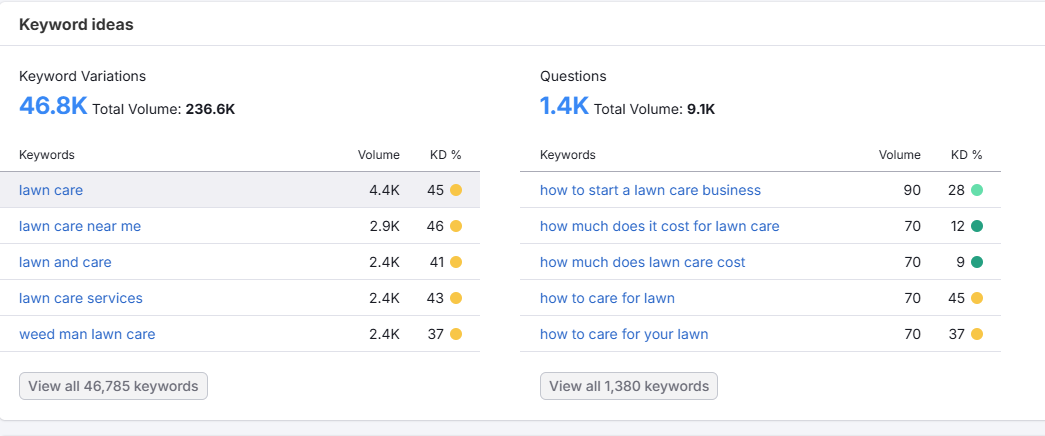
Here is a real example using Canadian search data. In Canada, the keyword "lawn mower" is searched approximately 22,000 times per month. The keyword "lawn care" is searched approximately 4,400 times per month.
At first glance, "lawn mower" looks better — it has more volume. But you need to look at the intent behind each search:
Search intent: buying vs. hiring
Wrong Keyword: "Lawn Mower"
People searching "lawn mower" are almost always looking to buy a lawn mower. They want a Home Depot, a Canadian Tire, or a manufacturer's website. If you run a lawn care service, this keyword will bring you traffic from the completely wrong audience — people who will never hire you.
Right Keyword: "Lawn Care"
People searching "lawn care" or "lawn care near me" are almost always looking to hire someone to take care of their lawn. This is exactly your customer. Lower search volume, but dramatically higher buying intent.
Here's what that looks like in Semrush data
Lawn Care — Hiring Intent
Lawn Mower — Buying Intent
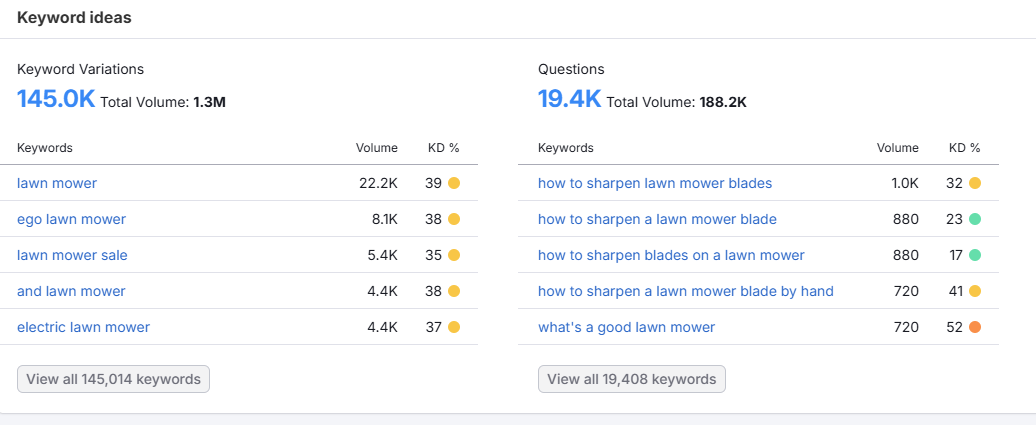
Notice the difference in the questions people ask. Lawn care searchers want to know "how much does lawn care cost" — they are ready to hire. Lawn mower searchers ask "how to sharpen a lawn mower blade" — they already own one and are doing it themselves.
How this plays out on a real website
If your page title and H1 use the word "mow" instead of "lawn care," you may show up in searches from people looking to buy mowers — not from people looking to hire a lawn care company. Here is how the keyword choice shows up in practice:
Targeting Wrong Keywords
Page Title:
ABC Lawn Mowing Services in TorontoH1:
We Mow Lawns So You Don't Have ToResult: Ranks for "mowing" and "mow lawns" — lower intent, fewer hires.
Targeting Right Keywords
Page Title:
ABC Lawn Care & Landscaping in TorontoH1:
Lawn Care & Landscaping in North TorontoResult: Ranks for "lawn care Toronto" — exactly what hiring customers search.
Another common example: snow removal
Wrong Keyword
Attracts people shopping for a shovel to do it themselves — not people looking to hire someone.
Right Keyword
Attracts people who want to pay someone to clear their driveway — your actual customer.
Before writing a single word on your website, ask: "Is the person searching this phrase trying to hire someone, or are they trying to do it themselves?" If the answer is "do it themselves," that is probably not your keyword. Choose words that match the intent of someone ready to spend money on your service.
You're Not Using Google Search Console
This is the last reason on our list — but arguably the most important step of all. Because none of the other 14 fixes matter if Google cannot even find your website in the first place.
Is your website actually on Google?
You might be surprised. We have had clients come to us frustrated that they are not getting any leads from their website — and when we investigate, we find that Google has never indexed it at all. The site exists. It is just invisible to Google.
Here is a quick test you can do right now. Open Google and search:
Replace yourwebsite.com with your actual domain. Google will show you every page it has indexed from your site. If nothing appears, your website is not on Google at all. If only one or two pages show up but you have ten, most of your site is invisible.
We worked with a lighting company that had 11 pages on their website. When we ran this search, only 1 page showed up. Ten pages — including their services page, their gallery, and their contact page — were completely missing from Google. No wonder they were not getting leads.
How to fix it: Google Search Console
Google Search Console is a free tool from Google that lets you tell Google your website exists, track which pages are indexed, and get notified about errors. Here is how to set it up:
Go to search.google.com/search-console
Sign in with your Google account. This is the same Google account you use for Gmail or Google Maps.
Click "Add Property" — choose Domain
Add your domain (example: mywebsite.com). Choosing Domain property means Google will track all versions of your site automatically — http://, https://, www., non-www., and any subdomains — all in one place.
Verify ownership with a DNS record
Google will give you a TXT record to add to your domain's DNS settings (found in your domain registrar — GoDaddy, Namecheap, Google Domains, etc.). This tells Google you own the site. Once added, Google will verify and activate your Search Console account within a few minutes.
Submit your sitemap
Once verified, go to Sitemaps and submit your sitemap URL (usually yourwebsite.com/sitemap.xml). This sends a direct signal to Google listing every page on your site that needs to be crawled and indexed. Google will typically crawl your site within 24–48 hours.
Common errors Search Console will warn you about
Once your site is set up in Search Console, Google will flag problems it finds. Here are the three you are most likely to see:
Duplicate Pages Without Canonical Tag
This means Google found multiple versions of the same page — for example, http://yoursite.com and https://yoursite.com both exist and Google does not know which one to rank. Fix: Add a canonical tag pointing to the correct version (the https:// version). This is covered in reason #1 of this guide.
Page With Redirect — This Is Usually Fine
This means an http:// version of a page is automatically redirecting to the https:// version. This is actually correct behaviour — it is a sign your canonical tags are working. Google acknowledges the redirect and indexes the canonical https:// version. You do not need to fix this.
404 Not Found
This means Google tried to crawl a URL from your sitemap or an internal link, but the page does not exist. Maybe you renamed a page, deleted a service, or updated a URL without fixing the old link. Fix: Update your sitemap and any internal links pointing to the missing URL. If the page moved, add a redirect from the old URL to the new one.
One important note before you submit:
Do not submit your site to Google Search Console yet if you have not fixed the issues covered in reasons 1 through 14. Submitting tells Google to come index your site right now — and if your page titles are vague, your NAP is inconsistent, your images have no alt tags, and your site loads in 9 seconds, that is the version Google will remember. Fix the issues first, then submit. You only get one first impression.
Google Search Console is the closest thing Google gives you to a direct line of communication. It tells you which pages are indexed, which keywords are bringing visitors to your site, and which errors are blocking Google from crawling you. It is free, it takes about 15 minutes to set up, and every small business website should have it running from day one.
Your Main Website Heading Does Not Say What You Do
Your main homepage heading is called the H1 heading.
Think of the H1 as the big title on the page. If someone lands on your homepage, they should understand your business almost immediately.
But many websites use H1 headings that sound professional but explain nothing.
Here are some examples of weak H1 headings:
These sound professional, but they do not clearly explain the business. Google and the visitor both have to guess what you actually offer and where you offer it.
An H1 should contain at least 2 things:
- Your service or product
- The area you offer it
Optionally, you can add your brand name — but it is not necessary.
Here is an example of a good vs bad H1 heading for a lawn care business:
Weak H1
No service. No city. No customer. Google has nothing to work with.
Better H1
Google and visitors understand the page instantly.
Another example of a good vs bad H1 heading:
Weak H1
Could mean almost anything.
Stronger H1
Service + location + customer type. Clear.
A strong H1 should have at least 2 things: your main service or product, and your city, region, or service area.
- Beautiful Spaces Start Here — It has nothing that mentions your service or city.
- Interior Painting Services in Hamilton for Homes and Condos ✓ — This one clearly indicates your services & cities and even specifies a specific type of painting they do.
Your Website Does Not Mention Your City Enough
Local SEO is about helping Google understand where your business works. If you want to rank in Toronto, Mississauga, Brampton, Hamilton, Pickering, Ajax, Vaughan, or other GTA cities, those locations should appear naturally on your website.
This does not mean stuffing the same city name 100 times. It means your location should be clear in the important places.
Your city or service area can appear in:
See the difference between a website that is missing location information and one that includes it clearly:
Missing Location
With Location
Here is an example of a GTA business that services multiple cities:
Weak Locations
Better Locations
Use your location naturally in the important parts of the page. Do not only hide your city in the footer.
Put your location in your headings, page content, service area section, FAQs, and image descriptions when it makes sense. Google should not have to guess where you work.
Your Service Pages Are Too Thin
A lot of small business websites have service pages with barely any content.
For example, a painting company might have a service page that says:
Service Page Is Too Thin
"Interior Painting
We offer professional interior painting services. Contact us today for a free quote."
That is too thin. Google has very little information to work with, and a customer has very little reason to trust the business.
A better service page for a painting business should explain all of these:
Better Service Page
"Interior Painting Services in Hamilton
Our team provides interior painting for homes, condos, rental properties, offices, and commercial spaces across Hamilton and nearby areas. We help with wall preparation, trim painting, feature walls, colour updates, and full interior repaints."
We know this business offers interior painting in Hamilton ✓
but it also lists the types of properties they paint
and the specific services beyond painting that differentiate them from their competitors.
Thin service pages are one of the biggest reasons a website is not ranking in Google. A service page should not just name the service. It should clearly explain:
- What the service includes
- Who it is for
- Where it is offered
- Why the customer should trust you
- What the customer should do next
Your Website Does Not Build Enough Trust
Ranking is not only about keywords. Your website also needs to help people trust you.
If your website says things like professional, reliable, trusted, or high quality, that is fine. But those words are stronger when you back them up with proof.
Trust Signals That Can Help
Do not just say you are trusted. Show people why they should trust you.
A page with real photos, reviews, service details, and clear contact information is usually much stronger than a page filled with vague claims.
Your Website Does Not Tell People What To Do Next
A website should not just give information. It should guide people toward the next step. This is where your CTA comes in.
CTA means call to action — the button or sentence that tells visitors what to do next. Weak CTAs are vague. Strong CTAs tell the person exactly what they are getting.
The strong CTAs explain the result. The customer knows exactly what will happen when they click. That can improve conversions because people feel more comfortable taking the next step.
Every important page should have a clear next step. A good CTA should answer: "What happens when I click this button?"
SEO should help bring people in — but your website still needs to turn them into calls, quote requests, leads, and sales.
Your Website Has Poor Internal Links
Internal links are links from one page on your website to another page on your website. They help Google understand how your pages connect and help visitors find useful information.
Weak Example
A landscaping website with 5 pages — but none of them link to each other:
Each page is an island. Google cannot figure out which pages are most important, and visitors have no clear path forward.
A good SEO rule for internal linking is to link each of your pages to at least three other pages on your website — not counting your main navigation menu.
For example, your contact page should be linked from your homepage, all of your service pages, and every blog post you write. If you have an "About Us" or "FAQ" page, you should also link to those from each of those pages.
Pages that only appear in the navigation menu are called orphan pages. This means Google and customers are less likely to find them. So if your goal is to get customers to fill out a contact form and submit it, link to that page from every other page on your site — not just the navigation.
Every time you publish a new page or blog post, ask yourself one question:
"What 3 pages on my website should this page link to?"
Here is a real example. You own a landscaping company in Etobicoke. You write a blog post called:
How Much Does Lawn Care Cost in Etobicoke?
"How Much Does Lawn Care Cost in Etobicoke?"
in Etobicoke
Services
Free Quote
Here is what each link says inside the blog post:
"If you want regular mowing, trimming, and yard maintenance, visit our lawn care services in Etobicoke page."
"If your yard needs more than mowing, you may also want our spring and fall cleanup services."
"To get pricing for your property, you can request a free lawn care quote."
That is a simple internal linking strategy. Here is what each link does:
- The blog post answers a customer question.
- The service page that you link to explains the main service.
- The cleanup page you link to is a related service.
- The contact page helps the visitor take action to book that service they just read about.
This makes the website easier for customers to use — and easier for Google to understand.
Your Website Has No Helpful Blog Content
Blog writing can help SEO when it answers real customer questions. Your blog should not be random.
Any blog that you write should answer questions that your customers actually search for:
Weak Blog Topic
Strong Blog Topics
"How Much Does Lawn Care Cost in Toronto?"
"How Often Should I Paint the Exterior of My House in Ontario?"
"Do I Need City Pages for Local SEO?"
Blog Content Should Do 3 Things
Every blog post should
Example of a good blog:
Northern Snow Removal — Port Perry
Good Title
"How Much Does Snow Removal Cost in Port Perry?"
Good Content
"Snow removal in Port Perry costs $50 per snowfall or $350 for the entire season."
Good Linking — 3 links inside this blog post
"To get a free quote, contact us to claim your 10% off discount."
The customer knows they are getting 10% off — not just clicking for a generic free quote. This is a specific reason to act.
"Curious how Northern Snow Removal got started? Read about our 10 year history."
Links to the About page where trust signals — like 10 years in business — help the customer feel confident hiring this company.
"Have questions about snow removal in Port Perry? Check out our FAQ page."
Links to the FAQ page where customers can learn more before deciding to book.
This blog has three links that guide the customer based on what they need — a discount, brand trust, or more information about the service.
Do not write just to "post something." Write about questions your customers already ask. This can help you show up for more searches and support your main pages.
That is one way to increase website ranking on Google without making every page feel stuffed with keywords.
Your Images Are Missing Alt Tags
Image alt tags help describe images to search engines and people using screen readers. They are also another place to give Google helpful context.
A lot of small business websites upload images with file names like IMG_4827.jpg — which explains nothing.
A good alt tag should contain three things:
- Service or product
- City
- Brand name
Weak Alt Tags
Good Alt Tags
A good image alt tag should describe what is actually in the image. When it makes sense, include the service and location naturally. Do not overdo it — the alt tag should honestly describe the image. But if the photo clearly shows your service in a city, say that.
Alt tags are not the biggest ranking factor, but they are part of a complete Google website ranking strategy.
Your Google Business Profile Is Not Supporting Your Website
For local businesses, your Google Business Profile can be very important. This is the profile that can show up on Google Maps and in the local map results.
Your website and your Google Business Profile should work together. If your website says you offer painting in Hamilton, but your Google Business Profile is incomplete, missing services, or has weak categories — your local SEO may suffer.
Your Google Business Profile should be clear about the following things:
- Business name
- Business category
- Services
- Service areas
- Hours
- Phone number
- Website link
- Photos
- Reviews
- Business description
For example, let's say you run a lawn care business called Phil's Lawn Care in Mississauga. Your Google Business Profile should not be vague — it should clearly match what your website says, what services you offer, and where you do the work.
1. Business Name
Your business name should be listed clearly as it actually appears. For Phil's Lawn Care, that is simply: Phil's Lawn Care. Do not stuff extra keywords into the business name unless they are part of your real business name.
2. Business Category
Your main category should match your main service. For Phil's Lawn Care, the correct category is likely Lawn Care Service. This helps Google understand what type of business you are before it even reads your website.
3. Services
Your services should be specific and local when possible. Generic entries like "lawn services" or "yard work" give Google very little to work with. Here is what a specific service entry looks like:
Specific Service Entry
4. Service Areas
List the actual neighbourhoods and cities where you work — not just the main city. For example: Mississauga, Port Credit, Streetsville, Erin Mills, Meadowvale, Cooksville, Clarkson, Lakeview, Lorne Park, Applewood. This helps Google and customers understand exactly where the business operates.
5. Hours
Your hours should match the hours listed on your website. Do not list your business as open 24 hours unless customers can actually call, book, or receive service at any time of day.
6. Phone Number
Use the same phone number on your website and your Google Business Profile. If your website shows one number and your Google profile shows another, that creates confusion for both customers and Google.
7. Website Link
Make sure the website link on your Google Business Profile is correct and sends people to the best page for your business — usually your homepage or a strong local service page.
8. Photos
Add real, current photos of your work. For Phil's Lawn Care that could include lawn mowing photos, before and after yard cleanup photos, team photos, equipment, and photos from real customer properties. When happy customers leave reviews, you can also encourage them to add photos.
9. Reviews
Good reviews are a strong trust signal. They help potential customers feel more confident and can support your local SEO over time. A specific review is more helpful than a vague one:
Vague Review
Helpful Review
10. Business Description
Your business description should explain who you are, what you do, where you do it, and what customers should do next. Do not write a list of random keywords. Here is a strong example:
Strong Business Description
Your Google Business Profile should support your website, not confuse it. If your website says you offer lawn care in Mississauga, your Google Business Profile should also clearly show lawn care, Mississauga service areas, matching hours, the same phone number, real local photos, strong reviews, and a clear business description.
When your website and Google Business Profile tell the same story, it becomes easier for Google and customers to understand your business.
What Should You Fix First?
If your small business website is not ranking, do not panic. Start with the basics. You do not need to fix everything in one day — but you should fix the biggest SEO signals first.
Check Your Page Title
Does it include your main service/product, city and brand name?
Weak Page Title
Good Page Title
Check Your H1
Does your main heading clearly say what you do and where you do it?
Weak H1 Heading
Good H1 Heading
Check Your Service Content
Does your website explain your services clearly — not just one sentence? You want real details: service descriptions, process, service areas, photos, FAQs, reviews, and trust signals.
Weak Service Content
Good Service Content
Check Your CTA
Does your button tell people what they are getting?
Weak CTA
Good CTA
Check Your Local Signals
Does your website clearly mention your city, service area, and nearby areas? If you serve the GTA, say that clearly. If you serve Hamilton, Burlington, Oakville, Mississauga, Toronto, Pickering, Ajax, Vaughan, Markham, or Brampton — make sure those areas are mentioned in a natural and helpful way.
Before using a ranking checker or worrying about advanced SEO tools, check the basics manually. Ask yourself:
- Does my title say what I do and where I do it?
- Does my H1 clearly explain the page?
- Does my content explain my service?
- Does my website build trust?
- Does my CTA tell people what to do next?
A ranking checker can show you where you rank. But it will not fix the reason your website is struggling.
Stop Making Google Guess
Here is the simple version.
If your website is vague, Google has less information to work with. If your website is clear, specific, and helpful, you give Google better signals.
A Simple Before and After Example
Let's say two lawn care companies open in Etobicoke.
Which website is easier for Google to understand? Company B. That does not mean Company B will rank overnight — but Company B is giving Google much clearer information. That is what good local SEO does.
When checking your website ranking on Google, do not only ask: "Where do I rank?"
Ask: "Does Google clearly understand my business?" That is the better starting point.
Final Thoughts From Junction SEO
Most small business SEO problems are not mysterious. Many websites struggle because they are too vague. They look nice, but they do not clearly explain the business in a way Google can understand.
Your website should clearly answer these questions:
The five questions your website must answer
When those answers are clear, your website has a much better chance of ranking for the searches that matter.
At Junction SEO, we help small businesses improve their local SEO in plain English. We look at your website, explain what may be holding it back, and show you practical fixes that make sense. No confusing SEO jargon. Just clear advice your business can actually use.
Not Sure Why Your Website Isn't Ranking?
Start with a free website audit and a free consultation call with Junction SEO. We'll show you exactly what may be stopping your website from ranking higher on Google — in plain English.
Get My Free Website Audit