Page Titles
Your page title is too vague — and Google has almost nothing to work with.
What Is a Page Title?
A page title is the title of your webpage that appears in Google search results. It is the first thing Google — and your potential customer — sees before clicking.
Here is what a page title looks like inside Google search results:
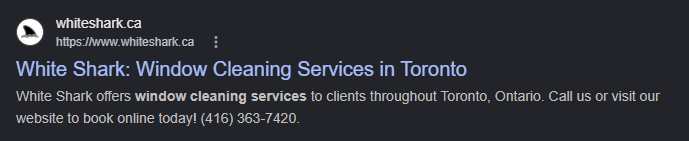
It helps Google understand what your page is about, and it helps customers decide whether your website is worth clicking.
Why Page Titles Matter for Your Google Rankings
If your page title is vague, Google may not understand which searches your page should appear for — so it may not show your website at all.
Page titles are one of the strongest signals Google uses to decide what a page is about. A weak title gives Google very little to work with. A stronger title gives Google a clear reason to connect your page with local searches.
Weak Page Title
This tells Google the business name only — no service, no city, no reason to rank it for anything useful.
Strong Page Title
Service + location + brand. Google immediately knows what this page is about, who it serves, and where — and can rank it accordingly.
How to Fix Your Page Titles
A good page title needs three things — and most small business websites are missing at least one.
Service or Product
What you offer — be specific. "Window Cleaning", "Lawn Care", "Car Wash".
City or Region
Where you serve customers. "Toronto", "Pickering", "the GTA".
Brand Name
Your business name. It can go at the beginning with a colon, or at the end after a pipe ( | ) — either works.
- ClearView: Residential Window Cleaning in Mississauga
- Residential Window Cleaning in Mississauga | ClearView
Anatomy of a Strong Page Title
Summary — A Good Page Title Contains:
- Your service or product
- Your city or region
- Your brand name
Example of a Good Page Title
Residential Window Cleaning in Mississauga | ClearView Window Co.Want a deeper look at how page titles affect your rankings and click-through rate? Read our guide: Do Page Titles and Meta Descriptions Still Matter for SEO in 2025?
H1 Heading
Your H1 heading doesn't tell Google — or your visitors — what your business actually does.
What Is an H1 Heading?
Your H1 is the biggest title on your webpage — and one of the very first things Google reads when it visits your site
Think of it like the headline of a newspaper article. The headline tells you everything about the story before you read a word. Your H1 does the same thing — it tells Google and your visitors what the page is about the moment they land on it.
Every page should have exactly one H1. And it should be clear, not clever.
H1 headings that give Google nothing to work with:
None of these say what the business does or where. Google has to guess — and when Google guesses, it usually doesn't rank you.
Why Your H1 Heading Matters for Your Google Rankings
Google uses your H1 to decide what searches to show your page for — a vague H1 leaves Google with nothing to rank
When you write "Quality You Can Trust," Google reads it and still has no idea what you do or where. So it doesn't rank you for local searches. But when you write "Lawn Care Services in Etobicoke," Google instantly knows: this page is about lawn care, this business is in Etobicoke, show it when someone nearby searches for lawn care.
Weak H1
No service. No city. Google has nothing to rank this for.
Strong H1
Service + city. Google and the visitor understand the page instantly.
Weak H1
Could mean anything. A moving company? A life coach? Google doesn't know.
Strong H1
Service + city + who it's for. Crystal clear.
How to Fix Your H1 Heading
A strong H1 needs two things. A third makes it even better.
Service or Product
What you do. "Lawn Care", "Window Cleaning", "Interior Painting", "Mortgage Agent".
City or Region
Where you serve customers. "in Etobicoke", "in Toronto", "across the GTA".
Who It's For (optional)
A short qualifier that makes it even more specific. "for Homeowners", "for Restaurants", "Helping First-Time Buyers".
Summary — A Strong H1 Contains:
- Your service or product
- Your city or region
- Who it's for (optional but powerful)
Example of a Strong H1
Lawn Care Services in Etobicoke for Homeowners and Property ManagersLocation Signals
Your website doesn't clearly mention where your business serves customers.
What Are Location Signals?
Location signals are the words on your website that tell Google exactly where your business works — which city, neighbourhood, or region you serve
Google is very good at matching local businesses to local searches. But it can only do that if your website actually mentions where you work. If your website never says "Toronto," "Mississauga," or the name of your neighbourhood, Google has no way to connect you to people searching nearby.
Location signals are not just one thing in one place. They should appear naturally throughout your website.
Your city or service area belongs in all of these places:
Why Location Signals Matter for Your Google Rankings
Without location words on your website, Google doesn't know where you work — so it can't show your business to nearby customers searching for what you offer
Imagine two window cleaning companies. Both have clean websites and service pages. But one website mentions "East York," "Leaside," and "Danforth" throughout its pages. The other one never mentions a city at all. When someone in East York searches "window cleaning near me," which one does Google pick?
No Location Signals
Google can't tell if this company is in Toronto or Timmins.
Clear Location Signals
Google knows exactly where to show this business.
Too Vague
"Local" means nothing without a specific city or area.
Specific Cities Named
Google can now match this business to searches in all those cities.
How to Fix Your Location Signals
Add your city or service area to these five places — naturally, not as a keyword dump.
Page Title + H1
The most important spots. "Window Cleaning in East York" works in both your page title and H1.
Service Page Descriptions
Mention your city and nearby neighbourhoods naturally in your service page content — part of the sentence, not stuffed in.
Contact Section + Footer
Your address and "Serving [City]" in the footer reinforces your location on every single page of your site.
FAQ Answers
"Do you serve Pickering?" → "Yes, we serve Pickering, Ajax, Whitby, and Oshawa." Every FAQ answer is another location signal Google can read.
Image Alt Tags
"Lawn care crew mowing a lawn in Etobicoke" — one more location signal per photo, and it takes 10 seconds to write.
Summary — Location Signals Should Appear In:
- Page title and H1 heading
- Service page content
- Contact section and footer
- FAQ answers
- Image alt tags
Example of a Good Location Signal in a Service Description
Our window cleaners serve residential homes in East York, Leaside, Thorncliffe, and Danforth Village.Service Pages
Your service pages are too short and thin for Google to rank them.
What Is a Service Page?
A service page is a full dedicated page on your website for one specific service — not a bullet point on a list, an entire page
One of the biggest mistakes small business websites make is putting all their services on a single page. That one page is competing for every service at once — and usually ranking for none of them.
Every service you offer should have its own page. Window cleaning gets a page. Gutter cleaning gets a page. Pressure washing gets a page. Each one.
A proper service page covers all of these:
Why Service Pages Matter for Your Google Rankings
Google needs enough content on each page to understand what you do — two sentences gives Google almost nothing to rank
Think of it this way: if a competitor has a full page explaining interior painting in Hamilton — what's included, who it's for, photos, reviews, FAQs — and your page has two sentences, Google will almost always rank the competitor. They gave Google more to work with.
Too Thin — Won't Rank
Interior Painting
"We offer professional interior painting services. Contact us today for a free quote."
Two sentences. No city. No detail. Google has almost nothing to work with.
Built to Rank
Interior Painting Services in Hamilton
"Our team paints homes, condos, and offices across Hamilton. We handle wall prep, trim painting, feature walls, colour updates, and full repaints. Serving Hamilton, Stoney Creek, Ancaster, and Dundas."
- ✓ Service + city in the title and content
- ✓ Specific types of work listed
- ✓ Multiple neighbourhoods named
How to Fix Your Service Pages
Every service page needs these six elements to rank and convert visitors into customers.
Service + City in the Title and H1
"Interior Painting in Hamilton" — not just "Interior Painting."
What's Included
List what the service covers in detail. "We handle wall prep, trim, feature walls, full repaints, and touch-ups."
Who It's For
"We work with homeowners, landlords, condo owners, and small businesses."
Real Photos + Reviews
Before/after photos of your actual work. Real Google reviews. These help both Google and the customer trust your business.
FAQs
"How much does interior painting cost in Hamilton?" Answer real questions customers ask before booking.
A Clear Call to Action
"Get a Free Interior Painting Quote in Hamilton" — not just "Contact Us."
Summary — Every Service Page Needs:
- Service + city in the page title and H1
- Detailed description of what's included
- Who it's for and where you offer it
- Real photos and genuine reviews
- FAQs and a clear call to action
Example of a Strong Service Page Title
Interior Painting Services in Hamilton | Hamilton House PaintersTrust Signals
Your website doesn't give visitors a real reason to trust your business.
What Are Trust Signals?
Trust signals are the facts, proof, and credentials on your website that show Google — and real people — that your business is legitimate
Ranking is not only about keywords. Google also looks at how trustworthy and credible your website looks. If your site makes vague claims without backing them up, Google is less likely to send people your way. And visitors who do land on your site are less likely to call you.
Words like "professional," "reliable," and "trusted" sound good — but they mean nothing without proof behind them.
Trust signals that help a small business rank and convert:
Why Trust Signals Matter for Your Google Rankings
Google wants to show searchers businesses that look real and established — vague claims with no proof make your site look weak to both Google and customers
Don't just say your business is trusted. Show people why. Real photos, genuine reviews, specific credentials, and clear contact details are all things Google can read to decide whether your business deserves to rank.
Vague — No Proof
Why should someone trust you? There's nothing here to back it up.
Specific — Backed by Proof
Full Trust Example — East York Painters
East York's Top Rated Painters
Serving Danforth, O'Connor, and Greektown Since 1995
For 30 years, East York Painters has delivered quality residential painting. With over 1,000 Google reviews, real before and after photos, and 20,000+ completed jobs — backed by a lifetime workmanship warranty, $10 million in liability insurance, and 24-hour quote response.
How to Add Trust Signals to Your Website
Add as many of these as honestly apply to your business — the more proof, the better.
Google Reviews + Testimonials
Display your Google review count and rating prominently. Ask happy customers to leave specific reviews — "Phil's Lawn Care mowed our lawn in Port Credit" beats "Great service!"
Real Project Photos
Before and after photos are the single most powerful visual trust signal for a trade or home service business. Show the transformation.
Years in Business + Job Count
"In business since 2008" or "1,400+ completed projects" tells Google and customers you are established and experienced.
Insurance, Licensing + Warranty
"Fully licensed, WSIB-certified, $2M liability insurance." Credentials like these reduce a customer's risk and increase their confidence to hire you.
Summary — Add as Many of These as Apply:
- Google reviews and testimonials
- Before and after photos
- Years in business and completed job count
- Insurance, licensing, and warranty info
- Real address and clear contact info
Example of a Trust Signal in a Service Description
Hamilton painters with 10+ years experience, 200+ Google reviews, and a lifetime workmanship guarantee.Call to Action
Your website doesn't tell visitors what to do next.
What Is a Call to Action?
A call to action is the button or sentence on your website that tells a visitor exactly what to do next — and gives them a clear reason to do it
A website should not just give information. It should guide people to the next step. When someone lands on your service page and is ready to reach out, a weak CTA gets in the way. A strong CTA removes the friction and tells them exactly what happens when they click.
Weak CTAs that cost you leads every day:
These say nothing. What does "Contact Us" mean? Call? Email? A form? Will it take 2 minutes or 20? The visitor doesn't know — so they don't click.
Why Your Call to Action Matters for Your Google Rankings
SEO brings people to your page — but your CTA is what turns those visitors into calls, bookings, and paying customers
Even a perfectly optimised page fails if the visitor doesn't know what to do when they get there. A strong CTA removes hesitation. It tells people what they'll get, how long it takes, and what happens next. That clarity is what gets people to click.
Weak CTA
[ Contact Us ]
No context. No offer. No reason to click.
Strong CTA
[ Get a Free 2-Minute Lawn Care Quote ]
The visitor knows what they get, how long it takes, and it's free. Much easier to click.
Strong CTAs for local service businesses:
How to Fix Your Call to Action
Every CTA button on your website should answer four questions for the visitor before they click.
What Do I Get?
A quote? An audit? A phone call? Name exactly what happens when they click.
How Long Does It Take?
"2-minute estimate." "30-min call." Removing time uncertainty gets more clicks.
Is It Free?
If it's free, say so. "Free" is one of the most powerful words in a CTA. Don't make people guess.
What Happens Next?
"We'll send your quote within 24 hours." "Someone from our team will call you back." Removing uncertainty = more clicks.
Summary — A Strong CTA Answers:
- What the visitor will get
- How long it takes
- Whether it's free
- What happens after they click
Example of a Strong CTA
Get a Free 2-Minute Lawn Care Quote — We'll Respond Within 24 HoursInternal Linking
Your website pages don't link to each other — they're isolated islands.
What Is Internal Linking?
Internal links are clickable links inside your website that send visitors from one of your pages to another one of your pages
For example, a blog post about lawn care pricing could link to your main lawn care service page, your spring cleanup page, and your contact page. Internal links help both Google and your customers understand how your website is connected.
Google discovers your pages by following links. If a page has no links pointing to it — from anywhere on your site — Google may never find it. These are called orphan pages, and they rank for almost nothing.
Blog posts are one of the easiest ways to build internal links naturally. For a full walkthrough of structuring a post this way, see our guide on how to write SEO blog posts that rank on Google.
Your website is like a city. Your pages are buildings. Internal links are the roads connecting them. Google can only visit buildings it can drive to. If your contact page has no roads leading to it — no other page linking to it — Google rarely finds it.
Why Internal Linking Matters for Your Google Rankings
When your pages link to each other, Google understands which pages matter most — and your important service pages are much more likely to rank
Every time you publish a page or blog post, ask yourself: "What 3 pages on my website should this page link to?" Here is a real example — a landscaping company writes a blog post:
How Much Does Lawn Care Cost in Etobicoke?
"For regular mowing and yard maintenance, visit our lawn care services in Etobicoke page."
This links to the main services page for lawn care in Etobicoke.
"If your yard needs more than mowing, see our spring and fall cleanup services."
This links to the spring and fall cleanup services page.
"To get a price for your property, request a free lawn care quote."
This links to the quoting page or contact page.
How to Fix Your Internal Links
Follow this simple rule: every important page should link to at least 3 other pages on your website.
Homepage
Links to → Main service pages, location pages, contact page.
Service Pages
Links to → Contact page, related services, helpful FAQs or blog posts.
Blog Posts
Links to → The main service page, a related blog post, and the contact or quote page.
Location Pages
Links to → Relevant service pages, contact page, and nearby service areas.
Summary — The Rule of 3:
- Every important page links to at least 3 other pages
- Blog posts always link to the related service page
- Every page has a clear path to your contact or quote page
Example of a Good Internal Link in a Blog Post
"For regular mowing in Etobicoke, visit our lawn care services page."Blog Content
Your website has no helpful blog content for Google to rank.
What Is Helpful Blog Content?
Helpful blog content answers real questions your customers are already searching for on Google — before they decide who to hire
A blog should not be random company news. It should help someone understand your service, your pricing, your process, or your area — the things people actually search before they contact a business.
Strong blog topics answer questions like:
Why Blog Content Matters for Your Google Rankings
Your service page targets one keyword — each blog post gives your website another keyword to rank for, multiplying your chances of being found
A service page for "Snow Removal Port Perry" will only ever rank for a handful of searches. But blog posts can rank for all the related questions people ask before hiring you — each one a separate chance to appear on Google.
Weak Blog Topic
Strong Blog Topics
"How Much Does Lawn Care Cost in Toronto?"
"How Often Should I Paint My House Exterior in Ontario?"
"Is Snow Removal Worth It for a Mississauga Home?"
These topics work because they answer real questions people type into Google before they call a company.
How to Write a Blog Post That Ranks on Google
Every blog post that brings Google traffic needs these four things.
A Question-Based Title with Service + City
The title is what Google shows in search results. It needs to include the service and the city — exactly how someone would type it.
This includes the service (snow removal), the city (Port Perry), the question format, and the business name — everything Google needs to match it to the right searches.
A Clear Direct Answer at the Top
Answer the question in the very first sentence. Don't make people scroll. Google rewards pages that answer fast — and so do customers.
Notice how the first sentence gives a real number right away. The reader gets what they came for and keeps reading to learn more — instead of bouncing back to Google.
Real Pricing or Process Details
Vague answers lose customers. Real numbers build trust — and keep people on your page instead of going back to Google to find a company that's more upfront.
This kind of detail does two things: it answers the customer's real question, and it signals to Google that your page has genuine, useful information — not just filler text.
3 Internal Links
Every blog post should send visitors somewhere useful next — your main service page, your contact page, and a related service they might not know you offer.
"For full seasonal coverage, visit our snow removal in Port Perry services page."
This sends readers to your main local service page — the most important page for Google rankings.
"Ready to get started? Contact us for a free quote — and get 10% off if you book before November 1st."
Give them a reason to click and a reason to act now. A deadline or discount turns a reader into a lead.
"Did you know we also do gutter cleaning and window washing? Find out more on our gutter cleaning services or window washing pages."
This introduces customers to services they didn't know you offer — and gives Google more pages to connect together on your site.
Summary — Every Blog Post Needs:
- Question-based title with service + city
- Clear direct answer in the first paragraph
- Real pricing or process detail
- 3 internal links (service page, contact, related content)
Example of a Good Blog Title
How Much Does Snow Removal Cost in Port Perry? | Northern Snow RemovalImage Alt Text
Your images have no alt text — so Google can't read them.
What Is Image Alt Text?
An image alt tag is a short text description that tells Google — and screen readers — what your photo actually shows
When you upload a photo to your website, Google cannot see the image the way a person does. It reads the alt text instead. That alt text is how Google understands what is in your photo and connects it to your business and location.
Most small business websites upload images with auto-generated file names like IMG_4827.jpg and no alt text at all. That tells Google absolutely nothing.
A good alt tag includes up to 3 elements:
- What's shown in the image (the service or product)
- The city or location
- Your brand name (optional)
Why Image Alt Tags Matter for Your Google Rankings
Google can't see your photos — it reads the alt text instead, and a good alt tag gives Google one more signal about what you do and where you work
Alt tags are not the biggest ranking factor on your page — but they are one of the easiest things to fix. Every photo without alt text is a missed signal. In a competitive local market, every signal adds up.
Weak Alt Tags
Strong Alt Tags
How to Write Good Image Alt Tags
For every photo you upload to your website, aim to include 2–3 of these elements in the alt tag.
Describe What's in the Image
"Lawn care team mowing a residential backyard" — describe what the photo actually shows.
Add the City or Neighbourhood
"Lawn care team mowing a residential backyard in Etobicoke" — the city turns it into a local SEO signal.
Add Your Brand Name (Optional)
"...in Etobicoke by Green Yard Lawn Care" — adds a brand signal and makes the alt tag complete. Don't force it if it reads awkwardly.
Quick Rule for Every Image You Upload:
- Describe what the image shows
- Add the service or type of work
- Include the city or neighbourhood
- Add your brand name if it fits naturally
Example of a Good Image Alt Tag
Residential window cleaning on a home in Leaside | ClearView Window Co.Google Business Profile
Your Google Business Profile is incomplete or missing — and it's costing you free visibility every day.
What Is a Google Business Profile?
A Google Business Profile is a free profile Google gives every local business — it shows up on Google Maps and in the Map Pack above regular search results
You have seen the Map Pack before — when you search "plumber near me" and three businesses appear in a box with a map, ratings, hours, and a phone number right on the Google results page. That is the Map Pack. Getting there does not cost you a dollar in advertising. It is completely free.
It is also one of the most overlooked free wins in local SEO. Most small businesses not ranking on Google either have no Google Business Profile at all — or have one that is half-filled out from the day they created it and never touched again.
A fully optimized Google Business Profile can help you appear in front of customers searching in your area — even if your website is not yet ranking in the regular search results. It is one of the fastest things you can do to start showing up on Google. And it costs nothing.
Why Your Google Business Profile Matters for Your Rankings
The Map Pack sits above all organic search results — a business showing there gets huge visibility without paying for ads
When someone searches "window cleaning East York" or "plumber near me," Google shows the Map Pack first. The three businesses listed there show the customer your rating, your reviews, your hours, and your phone number — all without the customer ever clicking through to your website. That is incredibly powerful local visibility.
Incomplete Profile
No photos · generic category · no services listed
No service areas · 0 reviews · no description
Google doesn't know enough to rank this profile.
Complete Profile
Real photos · correct category · detailed services
Specific neighbourhoods · 40+ reviews · full description
Google has everything it needs to show this business.
How to Optimize Your Google Business Profile
Go through each of the 10 elements below. Every one you fix makes your profile stronger and your chances of showing in the Map Pack better.
Business Name
Use your real business name exactly as it appears everywhere else. Do not stuff keywords into it.
Business Category
Pick the most specific category that matches your main service. Don't pick "Contractor" when you should pick "Plumber." Google uses this to decide what searches to show your profile for.
Services — The Goldmine
Keep the service title clean — put geo details in the description. The description is where you geo-tag your services and tell Google exactly where you work.
Service Areas
List specific neighbourhoods and cities — not just the main city. Instead of "GTA," list every area you actually work in.
Hours
Match exactly what your website says. Do not list 24/7 unless someone can actually call and reach you at 2am.
Phone Number
Use the exact same number as your website footer. Different numbers on different platforms confuse both customers and Google.
Website Link
Link to your homepage or best local service page. Check it actually works — broken links make your profile look abandoned.
Photos
Add at least 10 real photos — before and afters, your team, your equipment, completed jobs. Update them every few months. Profiles with photos get far more clicks than those without.
Reviews
Ask every happy customer to leave a review. Respond to every review — good and bad. A specific review helps more than a vague one.
Business Description
Who you are, what you do, where you do it, and what customers should do next. No keyword lists — write a clear sentence or two.
A Fully Optimized Google Business Profile Contains:
Wrong business name, keyword stuffing. Risks suspension.
Your real business name — exactly as it appears on your signage and website.
Wrong — a store sells paint. You provide painting services.
Matches your actual service. Google uses this to decide which searches to show you in.
Typo in the name. No description. Google has nothing to work with.
"East York Painters offers residential painting in Leaside, Thornhill, O'Connor, and Davisville. We operate 7 days a week and offer 10% off for first-time clients and 20% for referrals."
Geo-tags the location, names the service, and gives customers two reasons to call.
Too broad. Google can't connect your profile to specific neighbourhood searches.
Specific neighbourhoods signal to Google exactly where you work.
Unless you're actually available 24/7, this risks suspension or edits from Google and frustrated customers who can't reach you.
Must match the hours on your website footer and contact page exactly.
You changed your number but forgot to update GBP. Customers call — nobody answers. Leads disappear.
Consistent NAP (Name, Address, Phone) across GBP and your website is an important local ranking signal.
Customers and Google can often tell. No local context, no trust.
Before-and-after shots work best. Customer-submitted photos are even better — they signal real activity to Google.
Stale, vague reviews with no owner responses signal an inactive business.
Specific, recent, location-named reviews with a response from the owner. Google rewards this with higher local visibility.
Vague. No services mentioned, no locations, no reason to choose you.
Names the services, geo-tags the neighbourhoods, and gives customers two reasons to call right now.
Page Speed
Your website loads too slowly — and slow sites rank lower on Google.
What Is Page Speed?
Page speed is how fast your website loads — measured in seconds — and Google has used it as a ranking factor since 2010
A slow website does two damaging things at once: it frustrates visitors who leave before they even see your content, and it tells Google that the experience is poor — which can push your rankings lower.
A practical goal: your page should load in under 3 seconds on mobile.
The four things that most commonly slow small business websites down:
Uncompressed Images
Uploading a 3MB photo straight from your camera means every visitor has to download that entire file. A compressed WebP version of the same photo can be under 150KB — 20× smaller with the same visual quality.
Video Backgrounds
A full-screen auto-playing video can add 15–50MB to your homepage. Most mobile visitors leave before it finishes loading.
Fonts Loading From External Servers
If your website loads Google Fonts from an external server, any slowdown on their end slows your page. Hosting fonts on your own server eliminates this.
Too Many Plugins or Scripts
WordPress sites often have 15–20 active plugins — each loading its own code on every page. Chat widgets, popup tools, cookie banners all add time before your content appears.
Why Page Speed Matters for Your Google Rankings
A slow website ranks lower and loses customers — two strikes at once that compound over time
Google measures how long it takes for the main content on your page to load. The slower it is, the more it drags your rankings down. And even if someone clicks through to your site, a 9-second load time means most of them leave before they read a single word about your business.
Slow Homepage
4MB hero photo (PNG, straight from camera)
Full-screen video background
3 Google Font families loading externally
15 active WordPress plugins
Load time: ~9 seconds on mobile
Fast Homepage
Same photo compressed to 180KB (WebP)
Static image hero — no video
One font family, self-hosted
5 essential plugins only
Load time: ~1.8 seconds on mobile
How to Speed Up Your Website
Start with these four fixes — compressing images alone will often cut your load time in half.
Compress Every Image to WebP
Use a free tool like Squoosh (squoosh.app) or TinyPNG. Convert photos to WebP format and keep them under 200KB. This is the single biggest speed win for most small business sites.
Remove the Video Background
Replace it with a strong static hero image. Visitors on mobile will thank you — and so will your load time.
Reduce Plugins and Scripts
If you use WordPress, deactivate and delete any plugin you don't actively need. Chat widgets, popup builders, and cookie consent tools all add load time.
Check Your Score With PageSpeed Insights
Go to pagespeed.web.dev and enter your website URL. Google scores your site 0–100 on mobile and desktop, and tells you exactly what to fix first. Aim for above 70 on mobile.
Summary — Speed Fixes in Order of Impact:
- Compress all images to WebP, under 200KB each
- Remove any video background from your homepage
- Delete unused plugins and scripts
- Check your PageSpeed Insights score and fix what it flags
Free Tool to Check Your Speed
pagespeed.web.dev — enter your URL and get a score from GoogleMobile-Friendliness
Your website doesn't work properly on a phone — and most of your customers are on one.
What Is a Mobile-Friendly Website?
A mobile-friendly website looks good and works properly on a phone — the text is readable, the buttons are tappable, and nothing overflows off the screen
Imagine you build a beautiful website — clean layout, great photos, professional design. You review it on your laptop and it looks perfect. Then a potential customer opens it on their phone and the text is tiny, the buttons are impossible to tap, and they have to pinch and zoom just to read a sentence. That visitor leaves immediately. And Google notices.
65% of all Google searches come from mobile devices. Google uses mobile-first indexing — meaning it looks at the mobile version of your website first when deciding how to rank you. Even for desktop searches. If your mobile experience is broken, your rankings suffer.
Why Mobile-Friendliness Matters for Your Google Rankings
Google judges your website on mobile first — a site that's broken on phones ranks lower even for people searching from a desktop
This is called mobile-first indexing. Google crawls and evaluates the mobile version of your site as the primary version. So even if your desktop site looks great, if the mobile version is messy or broken, Google sees that as the state of your website.
Not Mobile-Friendly
Text is 8px — must zoom in just to read
Navigation menu is cut off on the right side
"Call Us" button is 12px wide — impossible to tap
Images overflow the screen horizontally
Mobile-Friendly
Text is 16px+ and easy to read without zooming
Navigation collapses into a clean hamburger menu
"Call Us" button is full-width — easy to tap
Images scale and stack cleanly on the screen
How to Make Your Website Mobile-Friendly
Open your website on your actual phone right now and check these five things.
Text Size
Can you read every paragraph without zooming? If not, your text is too small. Minimum 16px on mobile.
Button Size
Can you tap "Call Now" or "Get a Quote" with your thumb without accidentally hitting something else? Buttons need to be large and have breathing room around them.
Mobile Navigation
Does your menu collapse into a clean hamburger menu on mobile? Or does it overflow off the screen? Tap every menu item and make sure it goes somewhere.
Image Scaling
Do your photos shrink to fit the screen or push past the edge? Every image should scale automatically to fit inside the phone's screen.
Section Spacing
Do sections stack in the right order and have enough space between them? Content that overlaps or looks crowded drives visitors away.
Summary — Mobile Checklist:
- Text readable at 16px+ without zooming
- Buttons large enough to tap with a thumb
- Navigation works and collapses cleanly
- Images scale to fit the screen
- Sections stack properly with breathing room
Quick Mobile-Friendly Test — Do This Right Now
Open your own website on your own phone and ask yourself:
- How long did it take to load?
- Do some of the pictures fail to appear or load slowly?
- Can you read all the text without having to zoom in?
- Is the layout centred, or do some lines scroll off into dead space on the right?
- Are the buttons centred and easy to tap with your thumb?
- Do all the links actually work?
- Does your contact form work on mobile — or is it cut off or impossible to submit?
Most small business website owners have never checked their own website on a phone. This is one of the most common — and most avoidable — reasons your site isn't ranking. The good news: once you spot the problems, they're usually a quick fix.
Business Info (NAP)
Your business name, address, or phone number is inconsistent across the web.
What Is NAP?
NAP stands for Name, Address, and Phone — the three pieces of information Google checks across your website, Google Business Profile, and every directory you appear in
Google cross-checks your business information across dozens of places: your website, your Google Business Profile, Yelp, Facebook, Yellow Pages, Nextdoor, Bing Places, Apple Maps, and more. When these all match exactly, Google feels confident your business information is correct and your business is legitimate.
When they don't match — even one digit off in a phone number, or a slightly different business name — Google starts to lose confidence. That lost confidence can affect your rankings.
One wrong digit in your postal code on your Google Business Profile — but the right one on your website.
An old phone number still on your website footer from when you first launched — but a new number on your GBP.
A Yelp profile with a slightly different business name than what appears everywhere else.
Why NAP Consistency Matters for Your Google Rankings
When your name, address, and phone number match perfectly everywhere online, Google has more confidence your business is real — and ranks it higher
Think of it from Google's perspective. If your business shows up in 10 different directories with 10 slightly different addresses, which one is correct? Google doesn't know. So it trusts you less. But when every single listing says exactly the same thing, Google knows your business is real, established, and located where you say it is.
Inconsistent NAP
Consistent NAP
How to Fix Your NAP
Pick one exact version of your business name, address, and phone — then make sure every place your business appears online matches it word for word.
Pick One Exact Version and Write It Down
Decide: is it "Phil's Lawn Care" or "Phils Lawn Care"? Full address with postal code. One phone number only. Write it down — this is your official NAP.
Update Your Website Footer First
Your website footer is the most important place. Make sure your name, full address, and phone match your official NAP exactly.
Check and Fix Every Directory
Go through: Google Business Profile, Yelp, Facebook, Bing Places, Apple Maps, Yellow Pages, Nextdoor. Update each one to match your official NAP exactly — including the postal code.
Use the Same Phone Number Everywhere
One phone number. Everywhere. Old numbers from when you first launched are one of the most common NAP problems we see.
Summary — Your Official NAP Should Appear Identically On:
- Your website footer (and contact page)
- Google Business Profile
- Yelp, Facebook, Nextdoor
- Bing Places, Apple Maps, Yellow Pages
- Any other directory your business is listed in
Example of a Consistent NAP
Phil's Lawn Care | 123 Main St, Mississauga, ON L5B 1A1 | 905-555-1234Keywords
You're targeting keywords that attract the wrong people — or nobody at all.
What Are Keywords?
Keywords are the words and phrases people type into Google — and they are how Google connects what people search for to your website
When you write content for your website, you are choosing which searches you want to show up for. Choose the right keywords and you attract customers ready to hire you. Choose the wrong ones and you attract visitors who will never spend a dollar with you — or you rank for nothing at all.
This is one of the most fixable mistakes in local SEO — and one of the most common.
"Lawn mower" — searched ~22,000 times/month in Canada. These people want to buy a lawn mower from Home Depot.
"Lawn care" — searched ~4,400 times/month. These people want to hire someone to take care of their lawn. That's your customer.
Why the Right Keywords Matter for Your Google Rankings
You can rank on the first page of Google and still get zero customers — if you're ranking for the wrong keyword, the people clicking are never going to hire you
More search volume is not always better. Search intent is everything. The question to ask about every keyword is: does someone searching this phrase want to hire me, buy from me, or are they just looking something up?
Wrong Keyword: "Lawn Mower"
22,000 searches/month. People want to buy a mower from Home Depot — not hire a lawn care company. Ranking here brings you zero customers.
ABC Lawn Mowing Services in TorontoRight Keyword: "Lawn Care"
4,400 searches/month. People want to hire someone to look after their lawn. Lower volume, but these are your actual customers.
Lawn Care & Landscaping in North TorontoWrong Keyword
Attracts DIYers buying a shovel — not people who want to hire you.
Right Keyword
Attracts people ready to hire someone — your actual customer.
How to Choose the Right Keywords
Before using any keyword, run it through this simple four-step check.
Ask: Does This Person Want to Hire Me?
Search the keyword yourself. What comes up? If you see e-commerce shops or how-to articles, people searching it are buying or learning — not hiring.
Use Hiring-Intent Words
Words like "service," "company," "near me," "hire," and "cost" signal hiring intent. "Lawn care service Toronto" beats "lawn mower Toronto" every time for a lawn care business.
Always Add Your City
"Lawn care" + your city = a local keyword Google can match you to nearby searchers for. Without the city, you're competing against national brands for a generic term.
Check Google Search Console
Search Console shows you which searches are already bringing people to your site. Focus on the ones with strong customer intent — not just the ones with the highest clicks.
Summary — The Right Keyword:
- Has hiring intent (someone wants to hire you, not buy a product)
- Uses service words: "service", "company", "near me", "cost"
- Includes your city or neighbourhood
- Matches what your actual customers search for
Right Keyword vs. Wrong Keyword
Google Search Console
You have no idea whether Google can actually find your website.
What Is Google Search Console?
Google Search Console is a free tool that shows you whether Google can find your website, which pages are indexed, what searches bring visitors, and what errors need fixing
Most small business owners have no idea whether Google has found their website or not. Google Search Console answers that question — and it is completely free. You log in, add your website, and Google shows you everything it knows (and everything it can't access) about your site.
We have seen real small business websites where 11 pages existed — but only 1 was indexed by Google. The services page, gallery, and contact page were completely invisible in search results. The owner had no idea. Search Console would have shown them immediately.
Before setting up Search Console, do this in Google right now:
site:yourwebsite.comReplace yourwebsite.com with your real domain. If nothing appears, Google hasn't indexed your site. If only 1–2 pages appear but your site has 10+, most of your pages are invisible to Google.
Why Google Search Console Matters for Your Google Rankings
If Google can't find your pages, none of the other SEO fixes matter — Search Console is how you know whether Google can see your website at all
Every fix in this guide — page titles, H1 headings, service pages, trust signals — only works if Google has found and indexed those pages. Search Console is the tool that tells you whether Google has. Without it, you are flying completely blind.
No Search Console
No idea if Google found your site
No idea which pages are indexed
No idea what searches bring visitors
No idea what errors are hurting your rankings
Search Console Set Up
Can see exactly which pages Google indexed
Can see which searches bring visitors
Google alerts you to errors on your site
Can submit new pages to Google directly
How to Set Up Google Search Console
It's free and takes about 15 minutes. Here are the four steps.
Go to search.google.com/search-console
Sign in with your Google account — the same one you use for Gmail or Google Maps.
Click "Add Property" — Choose Domain
Enter your domain (example: mywebsite.com). Choosing Domain property tracks all versions of your site at once — http, https, www, and non-www.
Verify Ownership With a DNS Record
Google gives you a TXT record to paste into your domain registrar (GoDaddy, Namecheap, etc.). Once you add it, Google verifies you own the site within a few minutes.
Submit Your Sitemap
Go to Sitemaps and submit your sitemap URL — usually yourwebsite.com/sitemap.xml. This tells Google every page on your site that needs to be indexed. Google typically crawls within 24–48 hours.
Summary — What Search Console Lets You Do:
- See which pages Google has indexed
- See which searches bring visitors to your site
- Get notified about errors hurting your rankings
- Submit new pages directly to Google
Quick Indexing Check
site:yourwebsite.com — paste this into Google and see how many pages appearWhy Your Small Business Website May Not Be Ranking — And What to Do About It
Most small business websites do not fail because they look bad. They fail because they are unclear to Google, unclear to customers, or missing the trust signals that help people feel confident enough to call, book, or buy.
If your site is not ranking, the reason is usually one of these 15 issues:
A strong local business website should clearly answer six questions:
When those answers are clear, your website becomes easier for Google to understand and easier for customers to use. That does not guarantee instant rankings, but it gives your website a much stronger foundation for showing up in local search results — and turning visitors into real leads.
Want Help Getting Your Website to Rank on Google?
No commitment · 100% free · Takes about 30 minutes
Junction SEO is a Toronto-based local SEO agency helping small businesses across the Greater Toronto Area rank higher on Google, get found by local customers, and turn searches into calls, bookings, and sales.
We review your website, explain the problems in plain English, and give you clear options based on how much help you want — starting with a free audit.